


let’s install the plugins!

Grab the Felt Instruments Installer for your system by selecting a link below:
macOS 10.13 or newer, Apple Silicon or Intel, 64-bit only
Windows 10 or newer, 64-bit only

Run the installer and redeem the download code you got in an email after the purchase. If it’s not in the main inbox, check sorted inboxes like notifications, SPAM, etc.
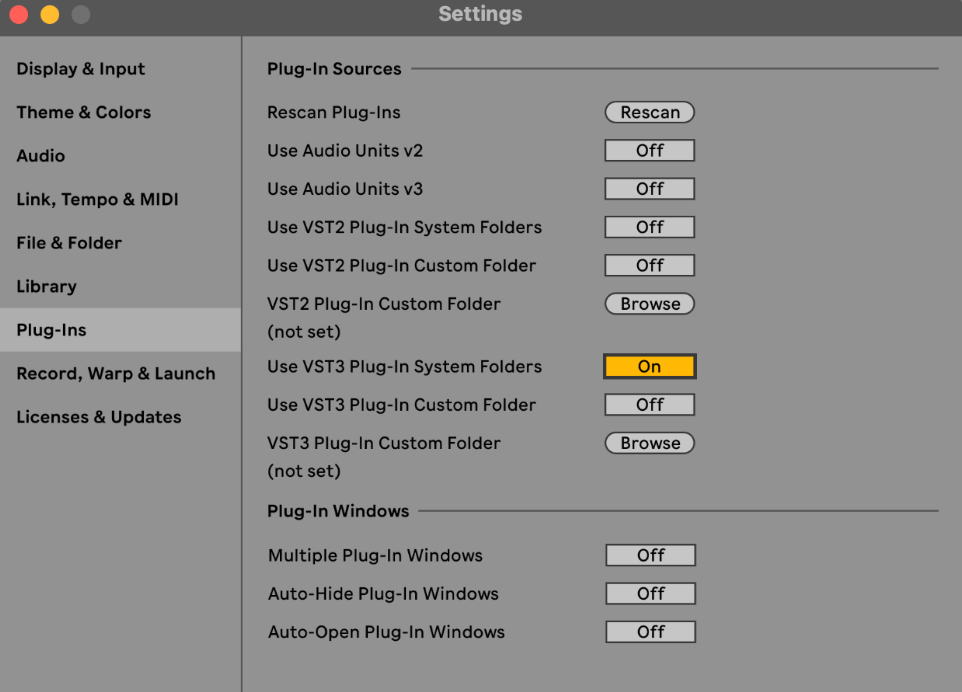
Follow the steps to install the plugin. If you’re using Logic or Garage Band, restart your Mac before loading the plugins. If you’re using Ableton or another VST3 DAW, make sure to enable the VST3 system folder in the preferences. Have fun!
THANK YOU!
Please check your inbox for your personal download code and setup instructions. If you can’t find the email in your main inbox, check sorted inboxes like notifications, SPAM, etc.
Visit this page on your desktop machine to access the installer download link.
FAQ
-
Yes! Once you’ve placed your order, you’ll receive a personal download code to redeem in the installer. The system will then wisely check all the data and will get you the files you need in no time.
-
Yes. Internet connection is needed for authorization and to download the sample files. The installer will guide you through the process. Once it’s done, you’re ok to disconnect from the web, enjoy your time making music or other real-life tasks.
-
Don't worry, you can easily request the codes to be resent! After launching the app and accepting the license terms, look for a small button located at the bottom left of the interface. Clicking this button will allow you to verify your email and receive all your download codes.
-
No, you can remove it. When you’ll need to download a new update or re-download the content, just visit this page, download it again and go.
-
Yes. The installer is built with a ‘no accounts, no passwords’ philosophy in mind. It will keep track of all plugins you have installed on your machine and will check for new updates when you’ll run it. If you need to re-download the content at some point, you’ll need your download code again.
-
Sure. Simply enter your download code into the installer and you’ll be able to download all the content in no time.
-
That’s ok! Your Pulse download codes were migrated to the new system, so you’re good to use them with the new downloader app.
-
The only things I record are: a confirmation that a download code has been redeemed, your IP address and machine ID, OS, and the path you’ve downloaded the content to. Everything else is all yours. This info is super helpful for troubleshooting, and it’s used just for that purpose. None of this is shared with third parties.
-
To uninstall a plugin, simply enter your download code into the Installer. The app will tell you the plugin has already been installed, and ask you what to do about it. Ask it to uninstall the plugin, and you’re done.
-
If you need help with something else, please, visit the Help page.